Start with a clear reference
Add one character image and one MP4 or WebM performance reference. Keep the performer and hands in frame.
Motion Transfer · MiniMax-H3 · 5s · 768P
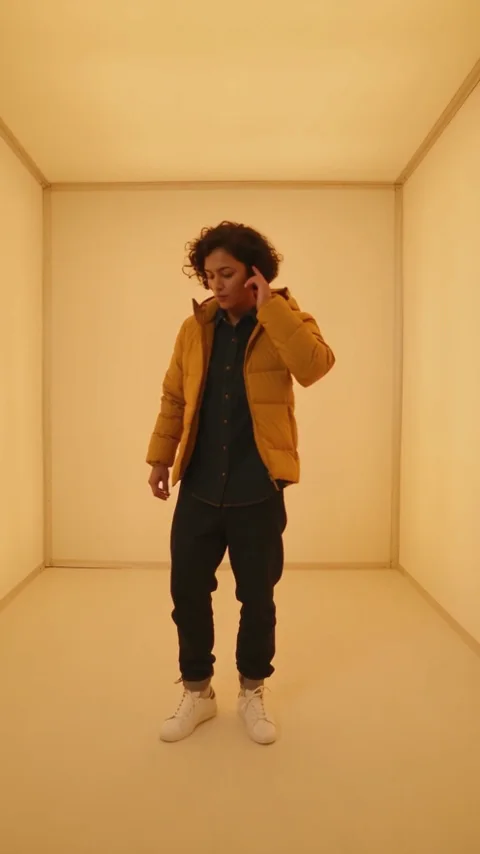
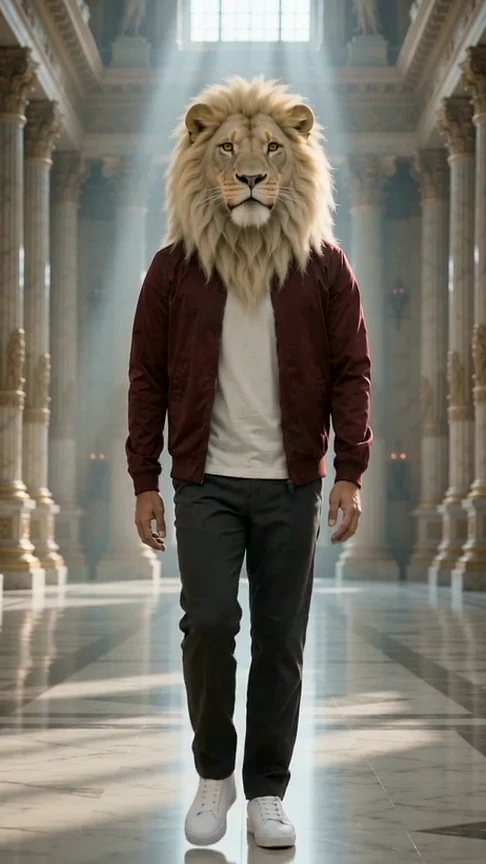
The two source videos show the reference performance and its example output. The character image belongs to that source pair.
Open the reference site Original → Reference preview
From photo to idea
The image supplies appearance; the video supplies a performance reference. Similar framing and a visible full body give the model clearer direction. A reference does not guarantee frame-by-frame choreography, identical camera motion or the length of the uploaded clip.
Add one character image and one MP4 or WebM performance reference. Keep the performer and hands in frame.
A new five-second video at the selected studio quality. Reference-video input may add credits; inspect the estimate first.
The two source videos show the reference performance and its example output. The character image belongs to that source pair.
One-time payment
Start with one trial video. Choose a subscription or one-time credits for more videos.
1 × 5s · 768P
Try one videoYour trial or a previously purchased video allowance is used first. You can also pay with general credits.
Choose a plan that fits your needsUse an image and a performance with comparable subject size. A full-body dance is a poor guide for a tightly cropped face photo.
Use one performer, clear hands and a short continuous movement. Camera cuts and occlusion give conflicting direction.
Reference-video input can add a media surcharge. The output still uses the five-second studio contract, regardless of the reference length.
Request a fixed camera and use a reference with a similar viewpoint. Generative references guide motion rather than lock every frame.
Use the supported MIME types shown in the studio. The server also validates actual media size, duration and ownership.
One character JPG, PNG or WebP and one motion MP4 or WebM. The existing studio checks file sizes, ownership and media duration before generation.
No. This page uses the current five-second service. Shorten the reference to the action you want to emphasize.
It is generative video with a motion reference. Pose, timing, framing and identity can change, so review the result before publishing.
Your trial or a previously purchased video allowance is used first. You can also pay with general credits. Pricing
No results yet. Start a task in a creative tool; your saved results will appear here.